
Would you hand over thousands of Rands for a device that might be locked to someone else’s iCloud account forever? It is a risk many buyers take every day without realizing how easily they could be scammed. Learning what to check when buying pre-owned iPhone models like the iPhone 13 or iPhone 14 is the only way to protect your money. You want the premium Apple experience without the brand-new price tag. We understand that. However, a polished screen can easily hide internal damage or a blacklisted IMEI.
We agree that finding a great deal shouldn’t feel like a dangerous gamble. You deserve a device that is reliable and transparently sold. This expert-vetted 2026 checklist ensures your next phone is genuine, functional, and worth every cent. We will guide you through verifying the latest iOS 26.5.2 compatibility, checking for Second-Hand Goods Act compliance, and testing for that vital 80% battery health standard. This step-by-step audit covers everything from physical hardware to legal status, giving you the confidence to buy or the clarity to walk away.
Key Takeaways
- Remove the case and screen protector to inspect for frame dents that could signal hidden internal board damage.
- Discover what to check when buying pre-owned iPhone models by using the ‘Parts and Service History’ menu to identify unoriginal components.
- Secure your investment by verifying that the Activation Lock is disabled and ‘Find My iPhone’ is turned off before any cash changes hands.
- Run essential hardware tests on the cameras and microphones to ensure every functional feature meets your standards.
- Compare the risks of private sales against professional retailers to secure a vital warranty and a clear return policy.
Step 1: Physical Inspection and Screen Integrity
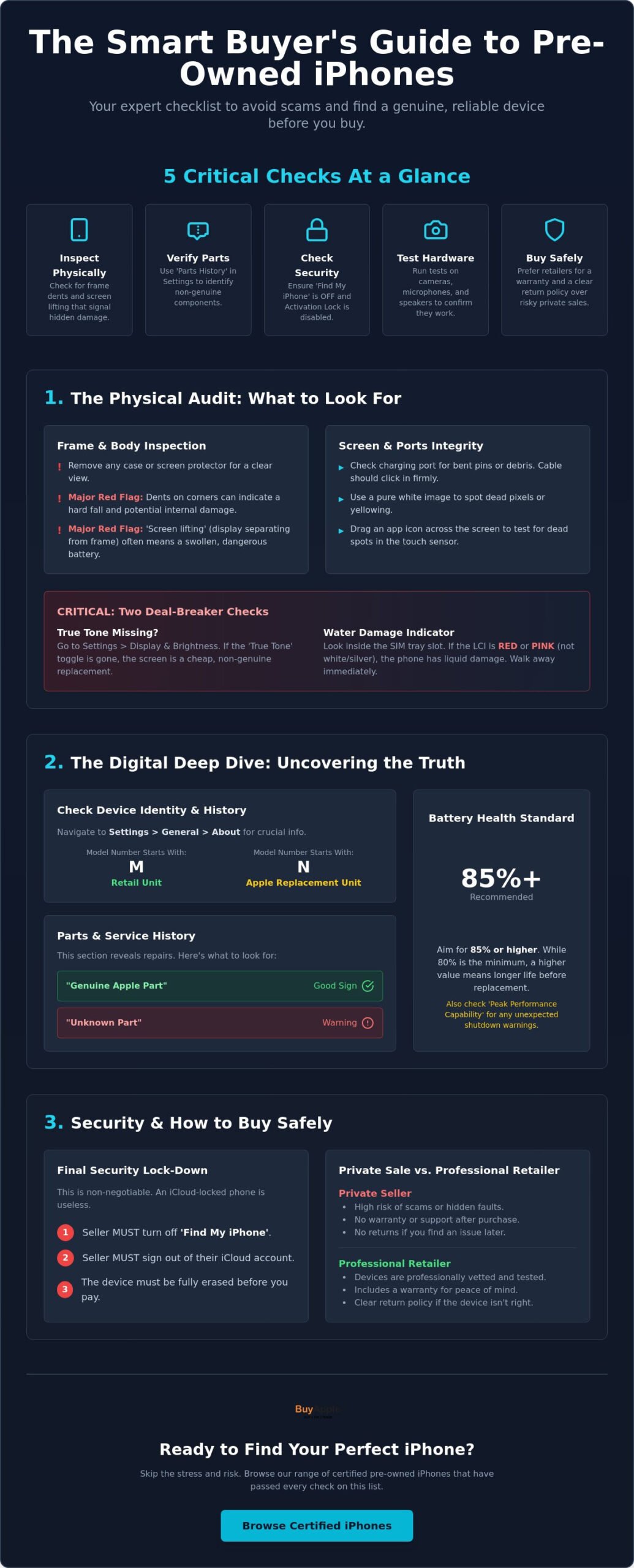
Start by stripping the device down. You cannot see the real condition of a phone while it is hidden behind a heavy-duty case or a thick glass protector. Ask the seller to remove them before you proceed. Surface scratches on the glass are common for used devices, but deep gouges can lead to structural cracks later. Pay close attention to the metal frame. Large dents on the corners often suggest the phone took a hard fall on a concrete surface. These impacts do more than scratch the paint. They can rattle internal components or even crack the motherboard. This is a critical part of what to check when buying pre-owned iPhone models if you want a device that lasts more than a month.
Next, look closely at the charging port. Use a flashlight to check for bent pins or a buildup of compressed lint. If the cable does not click into place firmly, you might face frustrating charging issues very soon. While you are looking at the edges, check for any “screen lifting.” This happens when the display panel starts to separate from the frame. It is a major red flag. Usually, this is caused by a swollen battery pushing the screen outward. A swollen battery is a fire hazard and requires an expensive, immediate replacement. Understanding the iPhone’s history and specifications helps you spot when a device does not look or feel right for its specific model year.
Testing the Display and True Tone
Screens are the most expensive parts to replace. To truly know what to check when buying pre-owned iPhone units, you must test the panel thoroughly. Pull up a pure white image and turn the brightness to 100%. Look for “dead pixels” or odd yellowing around the edges. Open your Settings and check for the True Tone toggle. If the toggle is missing, the screen has likely been replaced with a cheap, non-genuine part. Finally, drag an icon across the entire surface of the glass. If it “drops” the icon in certain spots, the touch digitizer is failing.
The Water Damage ‘Red Flag’
Water damage is a silent killer. Most iPhones have a Liquid Contact Indicator (LCI) tucked inside the SIM tray slot. Pop the tray out and look inside with a bright light. The indicator should be white or silver. If it is red or pink, the device has been exposed to liquid. Walk away immediately if you see this. Water damage is often a ticking time bomb for motherboard failure that no technician can easily predict.
Step 2: Internal Health and Parts History
Once you are satisfied with the exterior, it’s time to look under the digital hood. Software can tell you secrets that a polished screen cannot. This is a vital stage of what to check when buying pre-owned iPhone models because it reveals if the device has been tampered with. Open the phone and navigate to Settings, then General, and finally About. This screen is your primary source of truth. It lists the serial number, IMEI, and most importantly, the Model Number. If the Model Number starts with the letter ‘M’, it was originally sold as a new retail device. If it starts with ‘N’, it was issued by Apple as a replacement device. While replacement devices are usually fine, knowing the origin helps you verify the seller’s story.
Don’t stop there. Scroll down to verify the storage capacity. It is common for sellers to misremember if they bought the 128GB or 256GB version. Cross-reference what you see on the screen with the price you are being asked to pay. If you want to skip the stress of manual inspections, you can browse our range of certified iPhones that have already passed these internal audits. In newer models, you will also see a section called ‘Parts and Service History’. If a battery, camera, or display has been replaced, iOS will list it here. A ‘Genuine Apple Part’ message is a good sign. However, an ‘Unknown Part’ warning means a third-party repair shop used components that Apple doesn’t recognize. This could lead to performance issues or software glitches after your next update.
Interpreting Battery Health in 2026
Battery life is the single biggest concern for most buyers. By 2026 standards, you should aim for a maximum capacity of 85% or higher for a reliable daily driver. While some local retailers guarantee 80%, a higher percentage gives you more breathing room before a replacement is needed. Understanding pre-owned iPhone battery health is the #1 factor in device longevity. Always check the ‘Peak Performance Capability’ section right below the percentage. If it says the phone has experienced an unexpected shutdown, the battery is likely failing and can no longer handle high-power tasks.
Checking for Genuine Apple Parts
Non-genuine parts are more than just a cosmetic issue. They can break critical features like Face ID or the ambient light sensor. Following the advice from Consumer Reports can help you decide if a discounted price is worth the risk of a non-certified repair. Non-genuine batteries are particularly risky. They often lack the internal sensors required for health reporting and can lead to overheating. When you are learning what to check when buying pre-owned iPhone units, remember that a cheap screen replacement often lacks the durability and color accuracy of the original Retina display.
Step 3: Security, IMEI, and South African Network Status
Security checks are the most critical part of your purchase. You can fix a cracked screen, but you cannot fix a stolen device. Activation Lock is a security feature that links an iPhone to a specific Apple ID. If this is active, the phone is essentially a high-tech brick. This is why knowing what to check when buying pre-owned iPhone units starts with the lock status. Never buy a phone that shows the “iPhone Locked to Owner” screen. Even if the seller promises to unlock it later, you must insist they do it right there in front of you. They need to sign out of iCloud and turn off ‘Find My’ completely.
Beyond iCloud, you must verify the Carrier Lock status. Navigate to Settings, then General, then About, and scroll to Carrier Lock. It should ideally say “No SIM restrictions.” If it shows a specific network, the phone might not work with your MTN or Telkom SIM card. This is especially common with “UK used” imports or devices brought in from the US. These international versions sometimes have hardware differences that affect signal reception. Always insert your own SIM card and make a test call before paying. It is the only way to be 100% sure the antenna is functional and the device isn’t regionally locked to an overseas provider.
Avoiding the ‘Activation Lock’ Trap
If a seller refuses to erase the device or claims they forgot the password, walk away. There is no workaround for a legitimate Activation Lock. You should also look out for Mobile Device Management (MDM) locks. These are remote locks placed by companies on their employee phones. If you see a message about “Remote Management,” the phone still belongs to a corporation. It can be wiped or locked at any moment without your permission. A clean, personal device will always allow you to go through the full “Hello” setup screen without asking for a corporate login.
The South African Blacklist Check
Dial *#06# on the keypad to display the IMEI number. In South Africa, dealers are regulated by the Second-Hand Goods Act 6 of 2009. This law requires legitimate businesses to register with SAPS and verify the identity of their suppliers. It’s a safety measure designed to protect you from the trade of stolen electronics. While there is no single public government database for blacklisted phones in 2026, you can use reputable third-party tools to see if the IMEI has been reported as lost or stolen globally.
Ensure the model is ICASA approved for local frequencies. This guarantees you get the best 5G and 4G speeds on South African networks. Many imported models lack support for the specific bands used by MTN and Telkom, leading to dropped calls or slow data. When you prioritize what to check when buying pre-owned iPhone, the legal status and network compatibility should always be at the top of your list.
Step 4: Functional Hardware Performance Tests
You have confirmed the device is legal and the internal parts are genuine. Now, you must ensure the hardware performs as expected. This is the hands-on phase of what to check when buying pre-owned iPhone models. Start with the cameras. Open the app and cycle through every lens. Test the zoom from 0.5x to the maximum digital zoom. Look for any dark spots or ‘shaking’ in the viewfinder, which indicates a failing Optical Image Stabilization (OIS) system. Fire the flash several times to ensure it hasn’t burnt out. If the focus feels slow or hunting, the camera module might be nearing the end of its life.
Next, record a 10-second video while speaking clearly. Play it back at full volume. This single test verifies three things: the microphone, the bottom speaker, and the earpiece speaker. If the audio is muffled or crackles, the mesh might be clogged or the hardware could be failing. Connectivity is just as important. Turn on your personal hotspot and connect the iPhone. Pair it with a set of Bluetooth headphones or a smartwatch. If the signal drops or refuses to connect, the wireless IC chip is likely damaged. Always insert your own SIM card. The phone should catch a 4G or 5G signal within seconds. If it stays on ‘Searching’ or ‘No Service’, there is a serious antenna or logic board issue.
Ready to skip the manual testing? You can shop our fully tested pre-owned iPhone range and buy with total confidence.
Face ID and Biometrics
Never skip the biometric setup during your inspection. Go to Settings and attempt to register your face or fingerprint. If the system says ‘Face ID is not available’, the phone has a major hardware flaw. This often happens after a poor quality screen replacement or water exposure. Repairing Face ID is incredibly expensive and often requires a trip to a specialized technician. It is a deal-breaker for most buyers. When you are deciding what to check when buying pre-owned iPhone, biometrics should be non-negotiable.
Buttons and Port Stability
Press every physical button. The volume rockers, power button, and silent switch should feel ‘clicky’ and responsive. If they feel mushy or stuck, internal dirt or damage is to blame. Finally, plug in a charging cable. Wiggle the connector gently while it’s plugged in. The charging icon on the screen should stay solid. If it flickers or disconnects with a slight movement, the port is worn out and will eventually fail completely.
Step 5: The Safe Way to Buy Pre-Owned in South Africa
Where you buy is just as important as what you buy. Understanding what to check when buying pre-owned iPhone models won’t help if the seller disappears the moment you find a fault. Private sales on social media or classified sites often feel like a bargain. However, they come with zero protection. There is no warranty. No return policy. No recourse if the phone is blacklisted a week later. You are essentially gambling with your hard-earned cash in a parking lot or a coffee shop. It’s a stressful experience that often ends in disappointment.
Professional retailers provide a safety net that private individuals simply can’t match. Always look for a seller with a verified physical address and a solid history of customer reviews. A reputable dealer will offer at least a 6-month warranty on every device. This gives you peace of mind that the hardware is stable. If something goes wrong with the logic board or the screen, you have a place to go for a repair or replacement. You should also weigh the long-term value of a certified pre-owned iPhone vs new South Africa. You get a flagship experience for a fraction of the cost, provided the seller is legitimate.
Why Certified Pre-Owned (CPO) Wins
A Certified Pre-Owned device is not just a “used” phone. It has undergone a rigorous 40+ point inspection process by professional technicians. They check everything from the motherboard’s health to the vibration motor. This removes the guesswork for you. Buying from a registered business also means you get a formal VAT invoice. This is essential if you want to insure the device or claim it as a business expense. It’s the professional way to upgrade your tech without the typical risks of the second-hand market.
Final Verdict: BuyApple’s Quality Guarantee
We believe buying premium technology should be an exciting experience, not a risky one. BuyApple serves as your stress-free alternative to the uncertainty of private meetups. Every certified pre-owned Apple device in South Africa that we sell has been fully tested and guaranteed. We handle the technical audits so you don’t have to. You get a fresh, reliable device that works exactly as it should from the moment you turn it on. Why spend your weekend running through a 20-point checklist in a mall food court? Skip the hassle and browse our iPhone 11 certified pre-owned South Africa deals today for guaranteed quality at a price you can afford.
Secure Your Next iPhone Upgrade
Buying a used device doesn’t have to be a gamble. By now, you know exactly what to check when buying pre-owned iPhone models to ensure you get a quality device. Remember to prioritize the iCloud lock status, verify the battery health is above 80%, and always insist on a hardware test. These steps protect your investment and keep you from inheriting someone else’s technical headaches. You’ve done the research. Now it’s time to enjoy the premium Apple experience without the stress.
If you would rather skip the manual tests and hidden risks, we are here to help. Every device we sell undergoes an expert 40-point quality inspection before it reaches your hands. We back our quality with a 6-month warranty and provide secure nationwide delivery across South Africa. You get the technology you want with the peace of mind you deserve. Take the shortcut to a better phone today. Finding a reliable, high-performance device is finally within your reach.
Browse Certified Pre-Owned iPhones at BuyApple and find your perfect match with total confidence.
Frequently Asked Questions
What is the most important thing to check on a used iPhone?
The iCloud Activation Lock is the single most critical item to verify. If a device is locked to a previous owner’s Apple ID, you cannot use it. There is no legal way to bypass this security feature. Always ensure the seller has signed out and factory reset the device in front of you. This is the first step in what to check when buying pre-owned iPhone units to avoid buying a useless brick.
Can I check if an iPhone is stolen using the IMEI in South Africa?
South Africa does not have a single public government database for IMEI checks. However, you can use reputable third-party online tools to see if the device has been blacklisted globally. Legitimate dealers must follow the Second-Hand Goods Act 6 of 2009, which requires them to verify the identity of suppliers. Always check the ‘Carrier Lock’ status in the phone settings to ensure it isn’t restricted to a specific network like MTN or Telkom.
Is 80% battery health okay for a pre-owned iPhone in 2026?
A battery health of 80% is the industry minimum standard for a functional used device. While it will still work, you may notice shorter usage times between charges. For a reliable daily driver in 2026, aim for 85% or higher. If the health is below 80%, the battery is chemically degraded. It will likely need a replacement soon to maintain peak performance and prevent unexpected shutdowns.
What does ‘Activation Lock’ mean and can it be removed?
Activation Lock is a security feature that prevents unauthorized use if a device is lost or stolen. It can only be removed by the person who knows the original Apple ID and password. Never pay for a device that is still locked to an owner. If a seller cannot remove the lock immediately, walk away. It is a clear sign that the phone may not be theirs to sell.
Why is True Tone missing on some used iPhones?
The absence of True Tone usually indicates that the screen has been replaced with a non-genuine part. Cheap third-party displays lack the necessary hardware to communicate with the iPhone’s light sensors. This is a common shortcut used by informal repair shops to save money. Always check this setting to verify what to check when buying pre-owned iPhone screens for authenticity before you commit to the purchase.
Should I buy a pre-owned iPhone with a cracked back?
Avoid buying devices with cracked back glass, even if the price is low. Modern iPhones use the back glass for structural integrity and wireless charging. A crack compromises the phone’s water resistance and makes it vulnerable to internal dust buildup. Repairing the back glass is often as expensive as replacing the screen. This makes it a poor financial choice compared to a well-maintained device.
How do I know if a pre-owned iPhone has been repaired before?
Navigate to Settings, then General, and finally About to view the ‘Parts and Service History’ section. This feature lists any replaced components like the battery, camera, or display. If you see ‘Unknown Part’, it means a non-genuine component was used. Genuine Apple parts will be clearly labeled. This transparency gives you confidence in the quality of the repair work performed on the device.
Is it better to buy from a private seller or a certified store?
Certified stores are much safer because they offer warranties and professional inspections. Private sellers on social media provide no protection if the phone fails after a few days. A certified retailer will provide a VAT invoice and a clear 6-month warranty. This professional approach removes the anxiety and risk associated with high-value electronics purchases. It’s the most reliable way to secure a quality device.