


The newest MacBook on the shelf is rarely the best value for a South African student budget. We know the pressure. You need a fast, reliable laptop for your degree, but looking at the current MacBook for students South Africa price can feel overwhelming. It’s frustrating to choose between an expensive new model and the risk of buying a used device with a dying battery from a random seller.
You deserve a machine that just works. We understand that every cent counts when you’re balancing tuition and living costs. This guide will help you find the perfect balance between performance and price for your specific studies. We break down the specs of the 2026 MacBook Neo, compare the M-series chips, and show you where the real value hides. You’ll learn how to land a high-spec device for under R15,000 while ensuring you get a solid warranty and guaranteed battery health. Let’s get you ready for campus with total confidence and a laptop that lasts.
Key Takeaways
- Compare the 2026 MacBook for students South Africa price landscape. Find the best entry-level deals and high-value configurations for your budget.
- Learn which MacBook model fits your degree. Pick the right balance of portability and performance for your specific university workload.
- Discover the “CPO advantage.” Get a premium machine for a fraction of the cost without risking battery health or reliability.
- Identify the non-negotiable specs for 2026. See why unified memory and chip choice matter more than ever for long-term campus use.
- Secure your purchase with nationwide delivery and professional quality checks. Remove the anxiety of buying high-value electronics online.
The MacBook Student Price Landscape in South Africa (2026)
The tech market in South Africa is shifting. In 2026, finding a competitive MacBook for students South Africa price requires looking past the standard retail shelves. While big-box retailers push the latest M4 models, smart students are looking at the broader market. Apple devices stay relevant longer than almost any other laptop. If you look at the history of the MacBook, you’ll see a track record of hardware that supports macOS updates for seven years or more. This longevity means your investment doesn’t vanish the moment you walk out of the store. The resale value remains high. This is a massive win when you eventually want to upgrade after graduation.
Pricing trends in 2026 are heavily influenced by the Rand/Dollar exchange rate. This makes local retail prices fluctuate often. However, the introduction of the MacBook Neo has created a more accessible entry point for students. It’s a game changer for those who previously felt priced out of the Apple ecosystem. You don’t have to settle for a plastic Windows laptop that slows down after a year. Apple hardware is built to last through four years of university and beyond. It provides a seamless experience that helps you focus on your grades rather than your gear.
New vs. Pre-Owned: Where the Value Lies
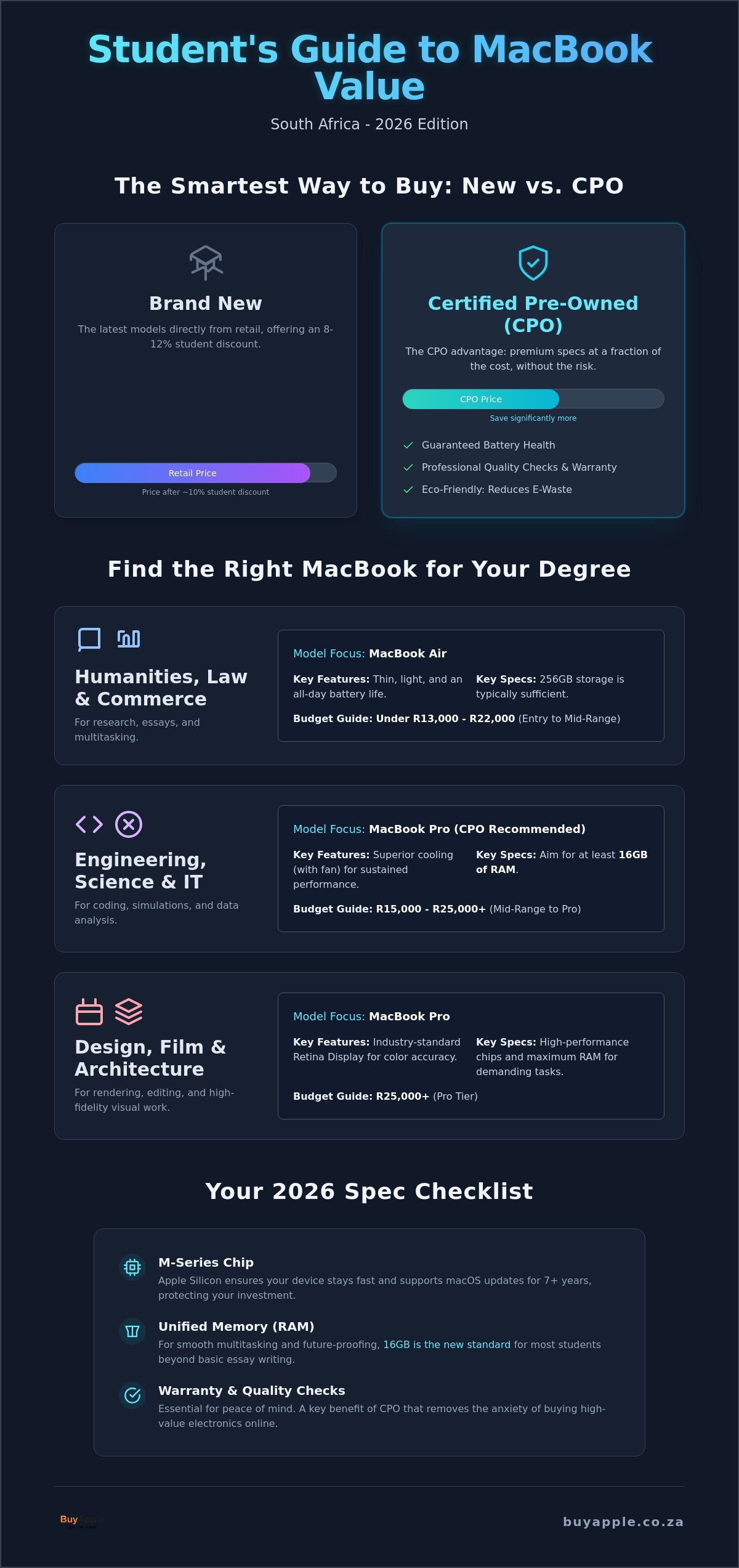
Education discounts usually shave off about 8% to 12% from the retail price. This is helpful, but it doesn’t match the savings found in the Certified Pre-Owned (CPO) market. Buying a CPO model often saves you a significant percentage compared to a brand-new unit. You can often get a higher-spec MacBook Pro from a previous generation for less than a basic new MacBook Air. It’s a smarter way to beat the “Apple Tax.” Plus, it’s better for the planet. Choosing a CPO device keeps premium hardware in use and reduces electronic waste. It’s the greener, more sustainable choice for the modern student.
The 2026 Student Budget Tiers
Setting a budget is your first step. Understanding the MacBook for students South Africa price landscape is easier when you categorize your needs into these tiers.
- Entry-level (Under R13,000): This tier is perfect for humanities or law students who need a light, reliable machine for research and essays. The MacBook Neo fits here perfectly.
- Mid-range (R15,000 – R22,000): This is the sweet spot for most degrees. You’ll find CPO MacBook Airs with M2 or M3 chips here. These handle multitasking, heavy browsing, and video calls with ease.
- Pro-tier (R25,000+): If you’re in architecture, film, or engineering, you need the sustained power of a Pro model. These are investments for high-performance creative work that requires more RAM and better cooling systems.
Choosing the Right Model for Your Degree
Not all degrees require the same horsepower. A student studying Law doesn’t need the same machine as an Architecture student. Getting the right fit saves you money on the initial MacBook for students South Africa price and ensures your laptop doesn’t lag during a final project. You want a tool that matches your workload without paying for features you’ll never use. Think about your daily routine. Will you be carrying it between campuses? Do you need to run heavy software, or just many browser tabs?
Best for Humanities, Law, and Commerce
These degrees involve lots of typing, research, and multitasking. The MacBook Air is the undisputed king here. It’s thin and light. You can carry it from the res to the lecture hall without back pain. Focus on battery life. The M1 and M2 chips are incredibly efficient. They easily last a full day of lectures on a single charge. If you’re looking for key specs to check, prioritize a comfortable keyboard and a reliable webcam for online tutorials. 256GB of storage is usually plenty for years of notes and research papers.
Best for Engineering, Science, and IT
You need more than just a pretty screen. Coding and running simulations require sustained power. While the MacBook Air is great for general use, it lacks a fan. For long coding sessions or running complex simulations, the thermal management in a MacBook Pro is superior. It prevents the processor from slowing down when the hardware gets hot. You should aim for at least 16GB of RAM. This allows you to run virtual machines or large data sets without the system stuttering. A Certified Pre-Owned MacBook Pro often offers better performance for these technical majors than a brand-new entry-level model.
Best for Design, Film, and Architecture
Visual work is demanding. You need the best display possible for color accuracy. Apple’s Retina Display is the industry standard for a reason. If you’re rendering video or working in 3D, GPU cores matter most. Look for a MacBook Pro with an M3 or M4 chip to handle 2026 creative software. Don’t settle for 8GB of RAM. Insist on 16GB or higher to keep your workflow smooth when using multiple Adobe apps. The 15-inch or 16-inch models provide the extra screen real estate you need for detailed editing. Ready to find your match? Browse our range of MacBooks tailored for South African students today.
The 13-inch vs. 15-inch debate usually comes down to your workspace. The 13-inch model is the king of portability and fits easily on small lecture hall desks. However, the 15-inch model offers more room for side-by-side windows. If you don’t plan on using an external monitor at your desk, the larger screen is a massive productivity boost.
Certified Pre-Owned (CPO): The Smartest Way to Save
Buying a second-hand laptop from a social media marketplace is a gamble. You might save money initially, but a “dud” battery or a failing logic board can cost you your entire semester’s work. This is where Certified Pre-Owned (CPO) changes the game. Unlike standard second-hand sales, a CPO device undergoes a professional restoration process. It’s the most effective way to lower the MacBook for students South Africa price without sacrificing reliability. You get the premium Apple experience at a price point that actually fits a student budget.
At BuyApple, our quality assurance isn’t just a quick wipe-down. We treat every device like it’s going to our own family. We know that as a student, your laptop is your lifeline. If it fails during finals week, it’s a disaster. That’s why we provide a clear warranty and dedicated support. It gives you peace of mind for the duration of your degree. You aren’t just buying hardware; you’re buying a guarantee that you can stay productive from day one until graduation.
The Inspection Process
Our testing protocol is rigorous. We focus on the high-wear areas that matter most. Battery health is a top priority. We ensure every Mac can handle the long hours away from a plug, which is essential for surviving loadshedding schedules on campus. We also perform deep audits on screen integrity and port functionality. We test the keyboard and trackpad responsiveness to ensure every click and keystroke is perfect. When you’re looking for Key Specs Every Student Should Check, remember that a healthy battery and a crisp display are just as important as the processor speed.
Why South African Students Trust CPO
The math is simple. Choosing CPO allows you to step up a tier. You can often afford a “Pro” machine on a budget that would normally only cover a basic “Air” model. This means more RAM and better cooling for those intense study sessions. Reliability is the core reason students choose us. You need to know your machine won’t quit during a 3 a.m. research session. For a deeper look at what makes our process unique, check out our Certified Pre-Owned Apple Devices South Africa: The 2026 Guide. It’s about getting the best possible tool for your education without the financial stress of buying brand new.
Key Specs Every Student Should Check in 2026
Specs aren’t just numbers on a box. They determine how long your laptop stays fast. In 2026, software demands have increased. What worked three years ago might feel sluggish now. When you compare a MacBook for students South Africa price, you need to look at what’s under the hood. Don’t just buy the cheapest option. Buy the one that will still be snappy when you’re writing your final thesis.
RAM, or Unified Memory, is your first priority. In 2026, 16GB is the new 8GB. Modern browsers and research tools eat up memory fast. Since you can’t upgrade a MacBook’s RAM later, getting this right at the start is vital. Storage is the next hurdle. A 256GB drive fills up quickly with high-res photos and course materials. You don’t necessarily need to pay for a 1TB model. Use cloud storage like iCloud or Google Drive effectively to keep your local drive clean. It’s a cost-effective way to manage a tighter budget.
Check the battery cycle count if you’re buying pre-owned. Most MacBook batteries are rated for 1,000 full cycles. A device with under 500 cycles still has plenty of life left. This is critical for surviving long days on campus without a charger. For the best performance, look at the M-series chips. The M3 offers a significant boost in efficiency over the M1, though the M2 remains a fantastic middle ground for most students.
Is the M1 MacBook Air Still Good in 2026?
Yes, it’s still a powerhouse for everyday tasks. If your degree involves mostly writing, research, and streaming, the M1 chip is more than enough. It’s the best “budget” entry point for South African students who want the Apple experience without the flagship price tag. Apple’s software support is legendary. The M1 is expected to receive macOS updates for several more years. It’s a safe, reliable, and incredibly portable choice for any humanities or commerce student.
Managing Power and Connectivity
Campus life is mobile. You need a machine that stays alive. Battery health is your best friend during South African power outages. A Mac that holds a 10-hour charge means you can keep working through loadshedding without stress. MagSafe charging is a huge plus. It snaps off safely if someone trips over your cable in a busy library. Don’t forget the extras. A small USB-C hub is essential for connecting older drives or printers. Pair your Mac with a set of AirPods for focused study sessions in noisy areas. Ready to upgrade your study game? Explore our MacBook deals for South African students and find your perfect match today.
Why BuyApple is the Best Choice for Your Student MacBook
Choosing where to buy your tech is just as important as the model you pick. We aren’t a faceless global corporation. We are a specialized South African retailer that understands the local landscape. We know the pressure of university deadlines and the reality of a student budget. Our mission is simple. We provide premium Apple hardware that doesn’t break the bank. You get a machine that powers your education without the financial stress of traditional retail markups. We prioritize your peace of mind from the moment you click “order” until the day you graduate.
Finding a competitive MacBook for students South Africa price is only half the battle. You also need a partner who stands by the product. We offer a transparent grading system for all our devices. You’ll know exactly what to expect regarding the cosmetic condition and functional health of your Mac. No hidden surprises. No “dud” batteries. Every device is backed by our quality guarantee. If you’re confused about which chip or RAM configuration fits your degree, our dedicated support team is ready to help. We provide expert advice tailored to South African university requirements.
Security is our top priority for every shipment. We offer fast, secure nationwide delivery across South Africa. Whether you’re staying in a university res in Cape Town or a home in Pretoria, your MacBook will reach you safely. We use trusted couriers to ensure your high-value electronics are handled with care. You can track your package every step of the way. It’s a smooth, guided journey designed to get you up and running as quickly as possible.
Shopping Made Easy
Our online store is built for speed and simplicity. We offer a streamlined checkout process with secure payment options you can trust. Each product listing includes detailed descriptions and high-quality reporting on device health. We believe in total honesty. You deserve to shop with confidence. For more tips on navigating the digital aisles, read our Apple Online Retailer South Africa: Your 2026 Guide to Buying Smart. It’s your roadmap to a hassle-free purchase.
Join the BuyApple Community
Don’t just take our word for it. Our community of students across the country is growing every day. Check out our customer reviews to see how we’ve helped other South Africans find their perfect study companion. We regularly share tech tips and exclusive deals to help you get the most out of your hardware. Stay informed by checking out our MacBook Price South Africa: The 2026 Buyer’s Guide to New & CPO Models. Join a group of savvy shoppers who value quality, transparency, and real-world performance. Let’s get you the Mac you need today.
Ready to Power Your Future?
Navigating the 2026 tech landscape doesn’t have to be stressful. You now know that the smartest MacBook for students South Africa price isn’t always found on a retail shelf. By choosing a Certified Pre-Owned model, you can secure the high-performance hardware your degree demands without the flagship cost. Remember to prioritize 16GB of RAM and check those battery cycles to ensure your machine lasts until graduation day. Whether you’re coding complex simulations or writing your first law brief, the right Mac makes all the difference.
We’re here to help you make the right choice. Our team is dedicated to providing reliable, affordable Apple solutions for every South African student. You can shop with total peace of mind thanks to our Certified Pre-Owned Guarantee and safe, secure online payments. We’ll deliver your new laptop directly to your home or res with our fast nationwide SA delivery service. Don’t wait for your current laptop to let you down. Browse Student MacBook Deals at BuyApple today and start your semester with the best tools available. You’ve got this.
Frequently Asked Questions
Do students get a special discount at BuyApple?
BuyApple focuses on offering the most competitive MacBook for students South Africa price from the start. While we don’t offer a separate student card discount, our Certified Pre-Owned models are often thousands of rands cheaper than new retail units. This ensures every student gets a great deal without needing to jump through hoops. Our goal is to make premium technology affordable for everyone in the South African education space.
Which MacBook is best for a first-year university student?
The MacBook Air with an M2 or M3 chip is the best all-rounder for most first-year students. It offers a perfect blend of portability and power for humanities, commerce, and science degrees. It’s light enough to carry between lectures and has the battery life to last through a full day of notes. If you’re starting a creative degree like film or architecture, you might want to consider a Pro model instead.
Is it better to buy a new MacBook Air or a pre-owned MacBook Pro?
It depends on your specific degree requirements. A new MacBook Air is great for portability and general tasks. However, a pre-owned MacBook Pro often provides better thermal management and more ports for technical majors. If you need sustained power for video editing or coding, the Pro is the smarter investment. You’ll often find that the MacBook for students South Africa price for a high-spec CPO Pro is similar to a basic new Air.
How long will a 2026 MacBook battery last during loadshedding?
Most Apple Silicon MacBooks in 2026 can easily last 12 to 18 hours on a single charge. This is more than enough to get you through even the longest loadshedding blocks. If you’re doing light work like word processing or web research, you won’t need to hunt for a plug point. Just ensure your battery health is above 80% to maintain this level of efficiency during power outages.
What is the minimum RAM I need for university in 2026?
You should aim for a minimum of 16GB of RAM in 2026. While 8GB was the standard for years, modern macOS updates and browser-based research tools are more demanding now. 16GB ensures your machine stays fast when you have dozens of tabs and PDFs open at once. Since the RAM is unified and cannot be upgraded later, it’s better to get more than you think you need right now.
Does BuyApple offer a warranty on student MacBooks?
Yes, every Certified Pre-Owned MacBook we sell comes with a quality guarantee. We understand that students need a reliable machine they can trust for their entire degree. Our warranty covers hardware defects and gives you the peace of mind that your investment is protected. We also offer dedicated support to help you resolve any technical issues quickly so you don’t miss any important university deadlines.
Can I upgrade the RAM or storage on my MacBook later?
No, you cannot upgrade the RAM or internal storage on any MacBook with an M-series chip after purchase. The components are soldered directly onto the logic board for maximum speed. This makes it crucial to choose the right configuration from day one. If you’re worried about storage space, we recommend using external SSDs or cloud services like iCloud to manage your larger files and project backups.
How do I know if a pre-owned MacBook is in good condition?
We use a transparent grading system and a rigorous testing process for every device. Every MacBook undergoes a multi-point inspection that checks battery health, keyboard responsiveness, and screen integrity. We report on the condition clearly so there are no surprises when your order arrives. You’ll receive a detailed report on the device’s status, ensuring you aren’t buying a “dud” from a random online seller.